Synthetic demo case study

From messy weekly orders to a repeatable operations report.

A raw CSV export becomes clean paid-order data, an exception review queue, an Excel dashboard, and a repeatable workflow that can be adjusted for future exports.

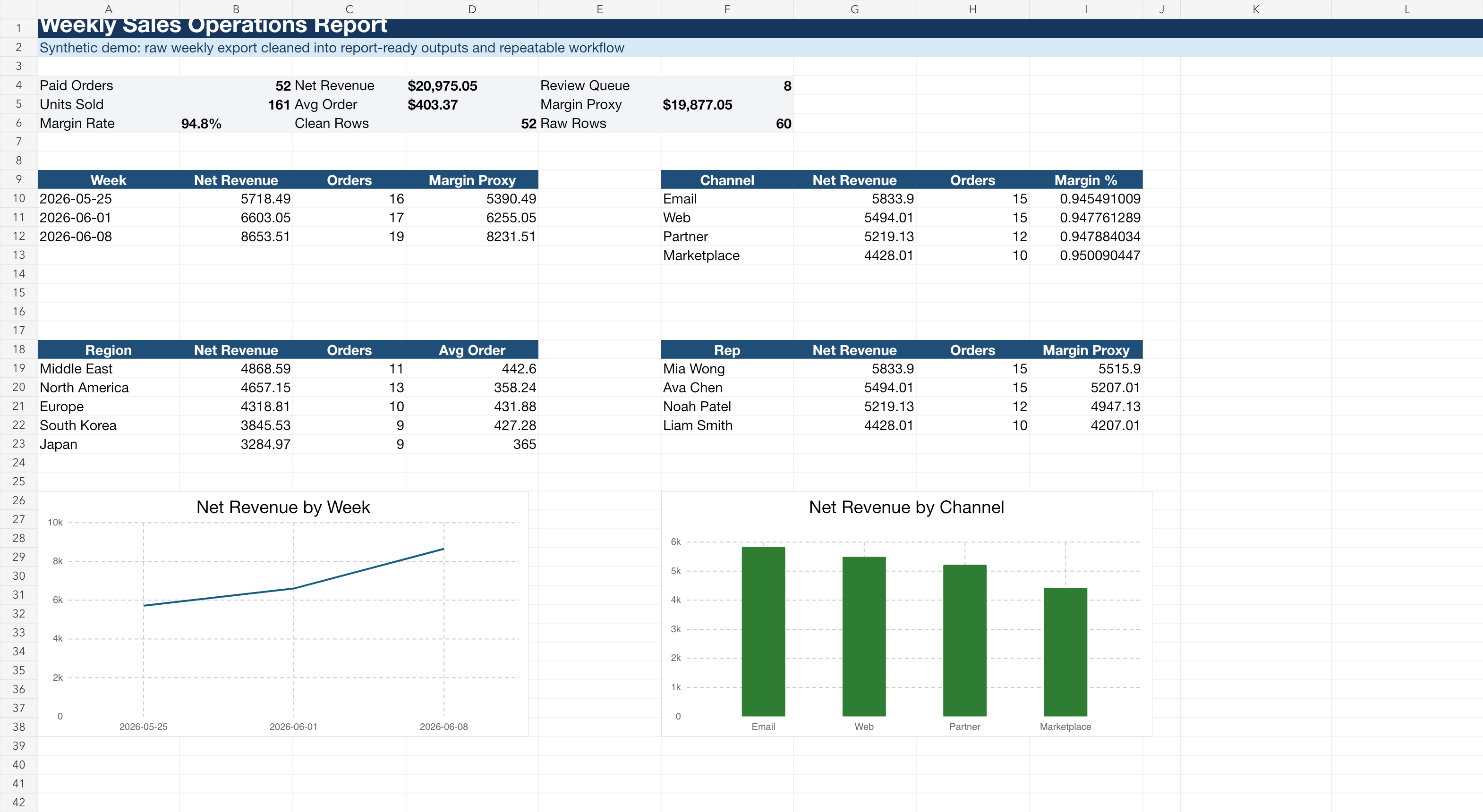
Excel dashboard with clean rows, review queue, weekly revenue, channel revenue, and summary charts
Demo dashboard generated from a cleaned weekly order export.

Problem

Manual reporting breaks down when the same cleanup rules repeat every week.

Small teams often know exactly which rows to keep, which rows need review, and what the weekly report should show. The work stays slow because those rules live in copy-paste steps instead of a repeatable workflow.

Input
Messy weekly order CSV
Clean output
Paid orders ready for reporting
Review queue
Pending, cancelled, refunded, duplicate, and test rows
Report
Excel workbook with weekly and channel summaries

Workflow

The script turns plain-English rules into stable outputs.

This demo is deliberately narrow: client-provided files, clear cleanup rules, and operational reporting. No private-system scraping, no account bypassing, and no claims about sales or accounting certainty.

Messy export in

The raw file includes issues that make weekly reporting tedious.

  • Duplicate order rows
  • Inconsistent channel names
  • Blank discount values
  • Paid, pending, cancelled, and refunded rows mixed together

Clean workflow out

The workflow separates reporting data from rows that need human review.

  • Clean paid-order CSV
  • Exception review CSV
  • Excel dashboard workbook
  • Repeatable script and simple handoff notes

Automation rules

synthetic demo
Step Rule Output impact
Normalize Standardize channel names and blank discount values Consistent reporting dimensions
Separate Move duplicate, test, pending, cancelled, and refunded rows Review queue instead of silent deletion
Keep Send paid orders to the clean output Report-ready CSV
Summarize Calculate revenue fields and group by week, channel, region, product, and rep Excel dashboard workbook

What this proves

This sits between manual spreadsheet cleanup and a larger internal tool.

It is useful when a team already has exports and rules, but the process is still trapped in manual weekly steps. The first version can stay lightweight: clean files, a review queue, a dashboard, and a script the team can run again.

Good fit

Use this for recurring file work.

  • Weekly CSV or Excel cleanup
  • CRM or lead-list import preparation
  • Agency reporting workflows
  • Ecommerce or operations exports

Boundaries

Keep the scope clean.

  • Synthetic demo data, not a paid client claim
  • Client-provided files only
  • No scraping behind logins, CAPTCHAs, or paywalls
  • No guaranteed sales, accounting, tax, or legal outcomes

Start with one sample

Have a weekly export your team keeps cleaning by hand?

Send a small sample file and the rules you currently apply. I can scope whether it should be a one-time cleanup, a repeatable script, or a small reporting workflow.

Email the sample brief

What to include

  • Small sample export
  • Cleanup rules
  • Review-row rules
  • Report format needed